

Product
Guide Builder
Generative AI drafts the guides. Your experts approve them before any technician sees them.
Guide Builder
Your best diagnostics live in the people who are hardest to book.
Guide Builder turns your experts' knowledge into troubleshooting guides the causal engine uses to work out what your technician checks next, at the machine.
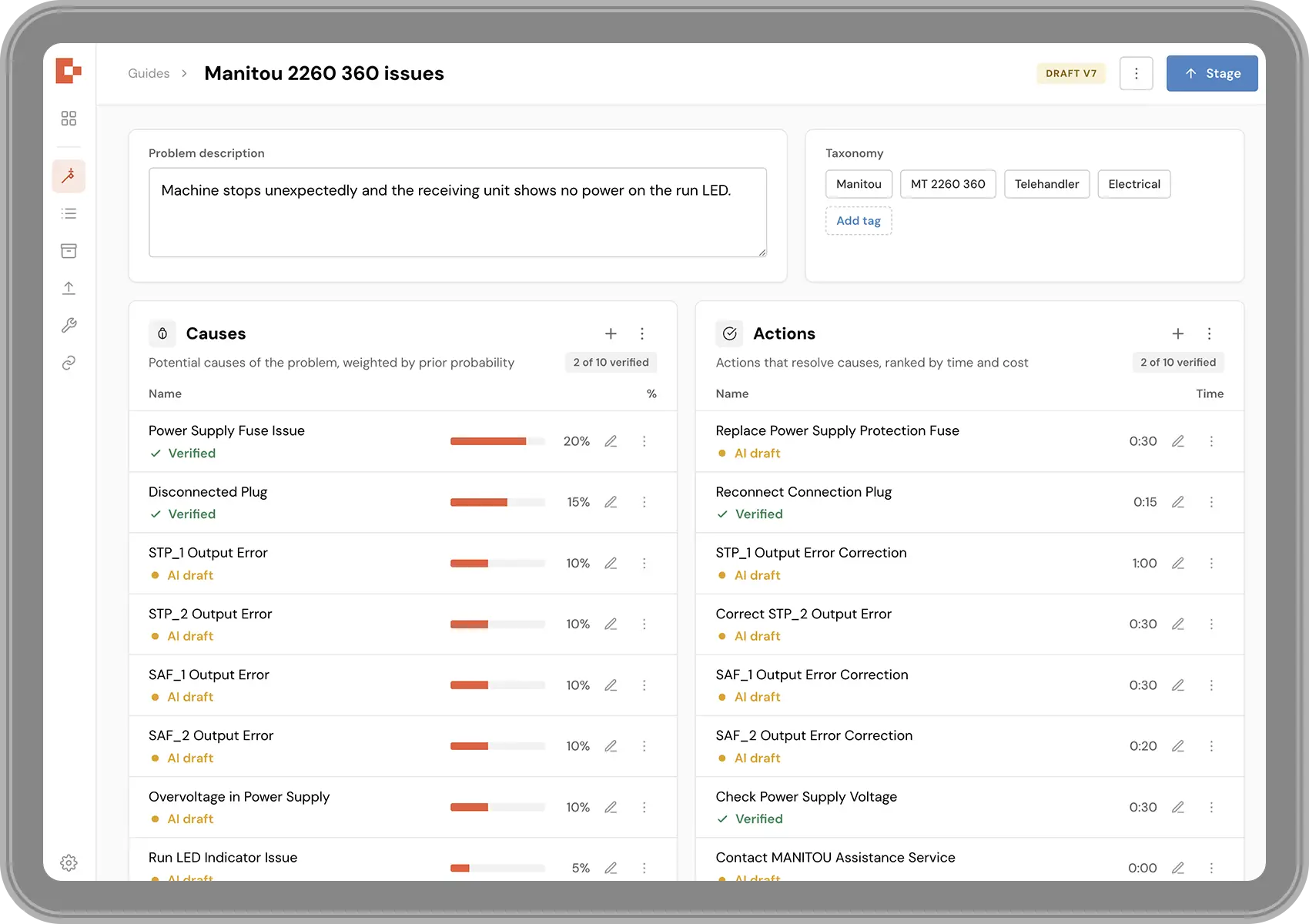
Guide Builder reads what you already have. Service tickets, work orders, manuals, and expert notes go in as-is. The AI drafts the causes for each fault, the actions that resolve them, and the questions that narrow them down. Your expert opens the draft, corrects what is wrong, and approves it before it reaches the field, ensuring a human in the middle. Coverage grows product line by product line while your experts stay on the machines.
Guide Builder drafts
Causes and their probabilities, actions, questions.
Your expert reviews and approves
The drafting is automated. The judgement stays with your expert.
How it works
Five steps from your service data to a published guide
Guide Builder does the drafting. Your experts spend their time on the decisions.
1
Ingest
Point Guide Builder at your tickets, work orders, manuals and expert notes. They go in as they are.
2
Draft
The AI proposes the causes with their probabilities, the actions that resolve them, and the questions that narrow them down. Every suggestion carries a link to the source it came from.
3
Validate
Your expert works through the draft, corrects it, and approves it. The approval is recorded against that version.
4
Enrich
Add photos, videos, IoT signals and spare parts lists. Check naming, translations and compliance.
5
Publish
Publish once and reach every technician, online or offline, on whatever device is at the machine.
Generative AI drafts the language.
The causal reasoning engine decides the next step at the machine.
Right AI for the right job.
Sources
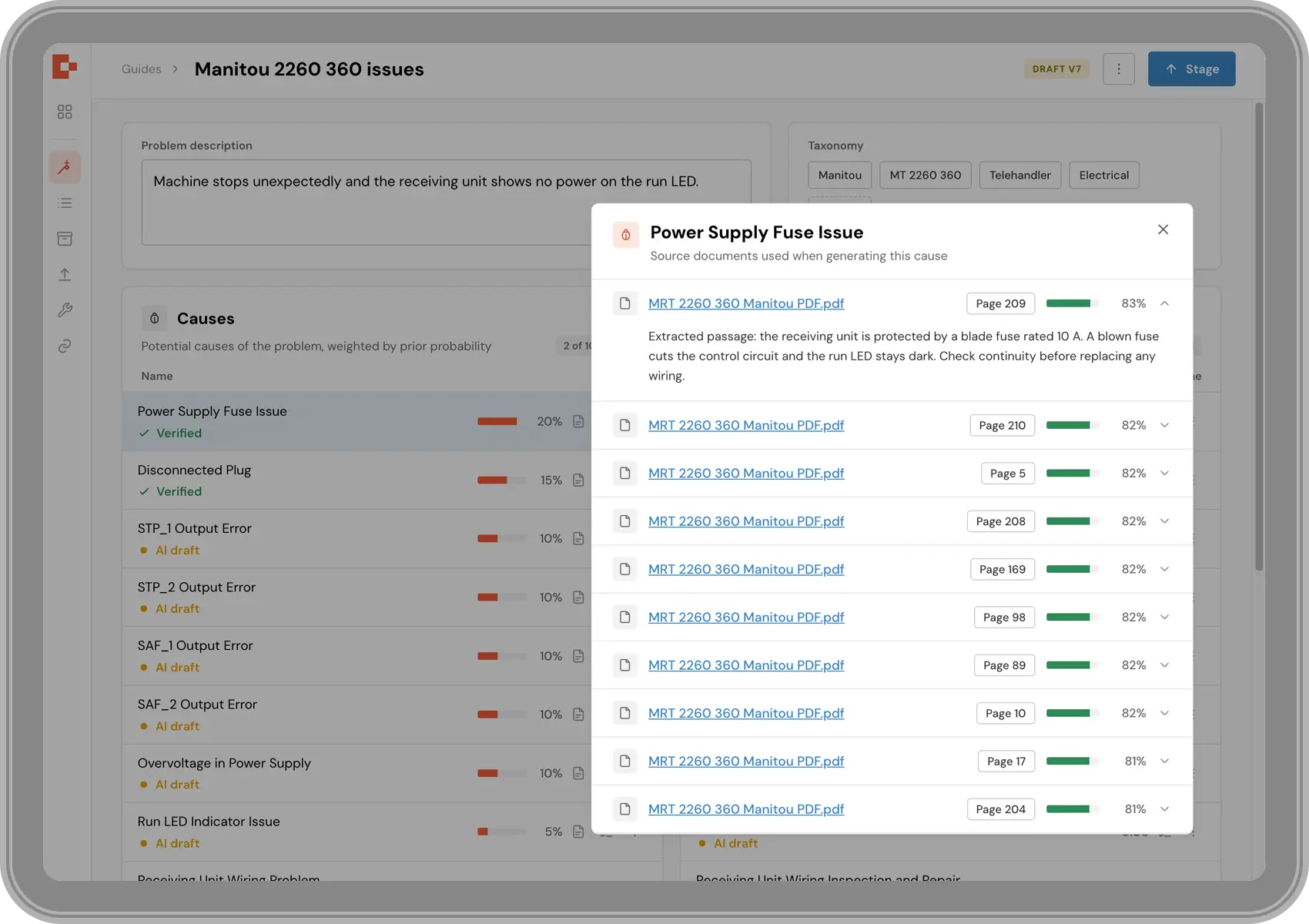
Click any suggestion and see where it came from
Guide Builder drafts from your own material. The source panel shows the manual page, ticket, or case, along with the excerpt the suggestion was drawn from.
That is what makes review fast. Your expert is not judging whether a suggestion sounds plausible. They can see the evidence behind it and decide whether it holds for the guide.
Validation
Drafts stay drafts until an expert approves them
A drafted guide is a proposal. It sits in review until someone who knows the equipment has been through it.
Your reviewer checks that the causes are the ones that actually occur, that the actions resolve them, and that a technician at the machine can answer the questions. They correct what is wrong and approve what is right.
Validation is also what the reasoning engine runs on. It computes the best next step from the causes, the probabilities, and the costs in the guide. Validated inputs are what make that output worth following.
Deployment
Your source documents can stay inside your network
Option 1: Dezide cloud
Upload your documents, cases, and manuals to Dezide and start drafting the same day. Hosted in the EU.
Option 2: Your own network
For content-sensitive teams, Guide Builder installs inside your own environment. Your tickets, work orders, and manuals stay there. Only the finished draft guides are sent to Dezide over a secure API. No raw data leaves the building.
Either way, your choice of model
OpenAI and Anthropic are supported out of the box. You can also point Guide Builder at a model you host yourself or at your own RAG system. Your content is never used to train a model.
Cloud
Hosted by Dezide
On-premises
Hosted in your own network
Build and maintain
One place to build the knowledge base and keep it current
Every troubleshooting session shows you where a guide held up and where it did not.
Products change, and new failure modes show up in the field. Guide Builder is where guides are created and kept current. Technician feedback and new cases come back in; your expert revises the guide; the new version goes through review; and the approved version reaches everyone. The previous approved version stays live until the new one is approved, so the field is never left without guidance.
+
Field feedback
New cases and technician notes flow back from the job
+
Update
Experts revise causes, actions, and questions
+
Re-approve
An expert signs off before it ships again
+
Republish
The latest validated version goes live everywhere
Proof
“Our experts now approve and refine instead of writing from scratch. We build guides far faster, with far less demand on the people we can least spare.”
Marc Van der Burght
Chief Operating Officer, IBA
Read case story →




Why Dezide?